Network coordination number
The coordination number of a pore is the number of throats that meet at it – a purely topological measure of how well connected each pore is to its neighbours. Because it counts throats, it is a discrete, integer-valued property rather than a continuous one like the pore radius. PoreScene can map such a per-pore property onto the stick-and-ball geometry, coloring each sphere by its own value and compositing a matching colorbar, so the connectivity of the void space can be read straight off the render.
This example loads a pore network from a MATLAB file, configures its
coordination_number property with a discrete color scheme, and builds the
stick-and-ball geometry. The throat cylinders are switched off so that the pore coloring
stands out on its own, and the network is rendered with every pore colored by the number
of throats connected to it.
This tutorial builds on the network morphology example and reuses the same pore network extracted from the freeze-dried sugar solution captured with X-ray micro-computed tomographic imaging [1], available in PoreScene’s repository on GitHub: data/pnm.mat
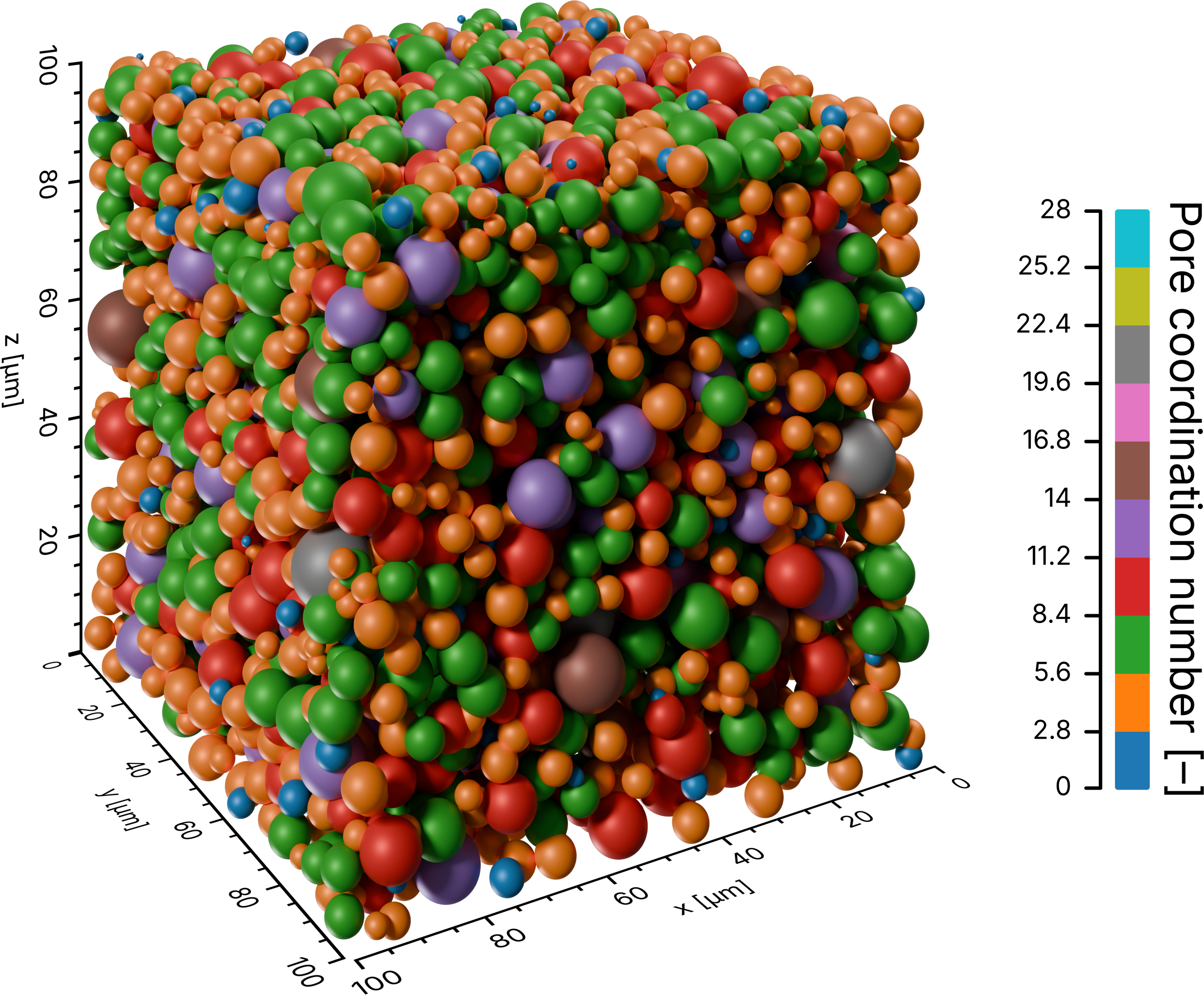
The rendered result: the pores in stick-and-ball representation, each colored by its coordination number from a discrete palette, with on-scale axes and the matching colorbar. The throats are hidden so the per-pore coloring is easy to read.
Step-by-step guide
1. Import required modules
Make sure to have porescene installed (see Installation). At first, required modules need to be imported:
import json
from pathlib import Path

from porescene import worker
from porescene.color.gradient import SegmentedGradient
from porescene.color.palette import Colormap, Palette
from porescene.config import PropertyConfiguration
from porescene.model import PoreNetwork
from porescene.scene import Scene
from porescene.utility import CompassDirection, Orientation
PoreNetwork holds the pore and throat data, while
Scene sets up the rendering stage. Module
worker provides the high-level helpers that build the stick-and-ball
geometry and render it colored by coordination number.
Palette and
Colormap supply the colors, and
SegmentedGradient groups them into discrete bands
instead of a smooth blend. PropertyConfiguration describes how
the coordination_number property is colored and labelled – with
Orientation and CompassDirection
placing the colorbar. File paths and directories are handled throughout PoreScene with
the built-in pathlib module, and json reads the variable mapping.
2. Set utility variables
After that, the directory holding the input data and receiving the rendered image is specified:
# data directory
pth_data = Path.cwd() / "data"
pth_data holds the input files – the pore network – and also receives the rendered
image together with its colorbar.
3. Load the pore network
The network is stored in a MATLAB file. Because the variable names inside such a file
differ from project to project, from_mat() takes a
mapping from PoreScene’s attribute names to the variable names in the file. That mapping
lives in map_vars.json and is loaded first:
# load variable mapping for variable import from .mat file
with open(pth_data / "map_vars.json") as f:
    map_vars = json.load(f)

# load pore network data from MAT file
pn = PoreNetwork.from_mat(pth_data / "pnm.mat", map_vars["data_network"])
The loaded PoreNetwork carries the pore positions and radii,
the throat radii, and the throat-to-pore connectivity that PoreScene needs to place the
spheres and cylinders. The mapping also points at the pore and throat coordination
numbers (cn_p and cn_t in this file), so they are imported alongside the geometry
and are exactly the property this example colors by.
4. Scene setup
The scene is created directly from the physical extent of the network, which sizes it
and calibrates the axes to the real dimensions of the sample (see Concepts & Conventions):
# initialize a new scene
sc = Scene(pn.extent)
Tip
To reuse a saved camera, lighting and axis configuration instead of the defaults, load
it from a PoreScene JSON file with
Scene.from_json().
Because the coordination number is a per-pore quantity, only the pore spheres need to be drawn. The throat cylinders are switched off in the scene configuration so they do not clutter the coloring:
# disable the throat cylinders so only the pore spheres remain
sc.config_scene.enable_cylinders = False
Next, the coordination_number property is registered on the scene. A
PropertyConfiguration names the property – the name
make_coordination_number() looks it up by later – and gives it
the colors to use. Unlike the continuous radius property of the
network morphology example, the coordination number takes
whole-number values, so a qualitative palette (the ten-color TAB10) is paired with
a SegmentedGradient to give each value band its own
flat color:
# initialize PNM property "coordination_number"
sc.config_scene.add_property(
    PropertyConfiguration(
        "coordination_number",
        Palette.load(Colormap.TAB10).subset(10),
        gradient_class=SegmentedGradient,
        heading="Pore coordination number [–]",
        orientation=Orientation.VERTICAL,
        align=CompassDirection.WEST,
    )
)
Palette.load(Colormap.TAB10).subset(10)
picks ten evenly spaced colors from the palette, and gradient_class swaps the default
smooth gradient for a SegmentedGradient, so equal
coordination numbers always map to exactly the same color instead of being blended across
neighbours. The remaining arguments shape the colorbar: heading sets its title, and
orientation and align stand it vertically on the west (left) side.
Tip
A discrete property such as the coordination number reads best with a qualitative
colormap – one whose colors are meant to be told apart rather than ordered. Any
member of Colormap can be dropped in here; the
SET1, SET2 and SET3 palettes are further qualitative options.
build_structure() then builds the stick-and-ball geometry, one
sphere per pore and one cylinder per throat. Calibrated axes are added around it:
# add cylinders and spheres to the scene
worker.build_structure(sc, pn)

# add axes around the scene
sc.create_axes()
Note
build_structure() still builds the cylinders; disabling them
in the scene configuration only keeps them from being shown and colored at render
time. This is why the same geometry can be reused to render the throats later without
rebuilding it.
5. Render by coordination number
make_coordination_number() does the coloring in one call: it fits
the segmented gradient to the coordination-number range, colors the enabled layers
accordingly, renders the scene, and composites the colorbar described by the
coordination_number property. Because the cylinders were disabled, only the pore
spheres are drawn and colored. The result is written into pth_data:
# render the scene and color the pores according to their coordination number
pth_img = worker.make_coordination_number(pth_data, pn, sc)
The render is named after the layer it shows – the pore spheres, colored by
coordination number – yielding sphere-coordination-number+axes.png next to its
colorbar and the on-scale axes.
Full script
The complete example, also available on GitHub: example/network_coordination_number.py.
 1import json
 2from pathlib import Path
 3
 4from porescene import worker
 5from porescene.color.gradient import SegmentedGradient
 6from porescene.color.palette import Colormap, Palette
 7from porescene.config import PropertyConfiguration
 8from porescene.model import PoreNetwork
 9from porescene.scene import Scene
10from porescene.utility import CompassDirection, Orientation
11
12# =============================================================================
13# Import Parameters
14
15# data directory
16pth_data = Path.cwd() / "data"
17
18
19# =============================================================================
20# Scene configuration
21
22# load variable mapping for variable import from .mat file
23with open(pth_data / "map_vars.json") as f:
24    map_vars = json.load(f)
25
26# load pore network data from MAT file
27pn = PoreNetwork.from_mat(pth_data / "pnm.mat", map_vars["data_network"])
28
29# initialize a new scene
30sc = Scene(pn.extent)
31
32# disable the throat cylinders so only the pore spheres remain
33sc.config_scene.enable_cylinders = False
34
35# initialize PNM property "coordination_number"
36sc.config_scene.add_property(
37    PropertyConfiguration(
38        "coordination_number",
39        Palette.load(Colormap.TAB10).subset(10),
40        gradient_class=SegmentedGradient,
41        heading="Pore coordination number [–]",
42        orientation=Orientation.VERTICAL,
43        align=CompassDirection.EAST,
44    )
45)
46
47# add cylinders and spheres to the scene
48worker.build_structure(sc, pn)
49
50# add axes around the scene
51sc.create_axes()
52
53
54# =============================================================================
55# Render pores colored by coordination number
56
57# render the scene and color the pores according to their coordination number
58pth_img = worker.make_coordination_number(pth_data, pn, sc)